Monday, January 5, 2015

Locking down software

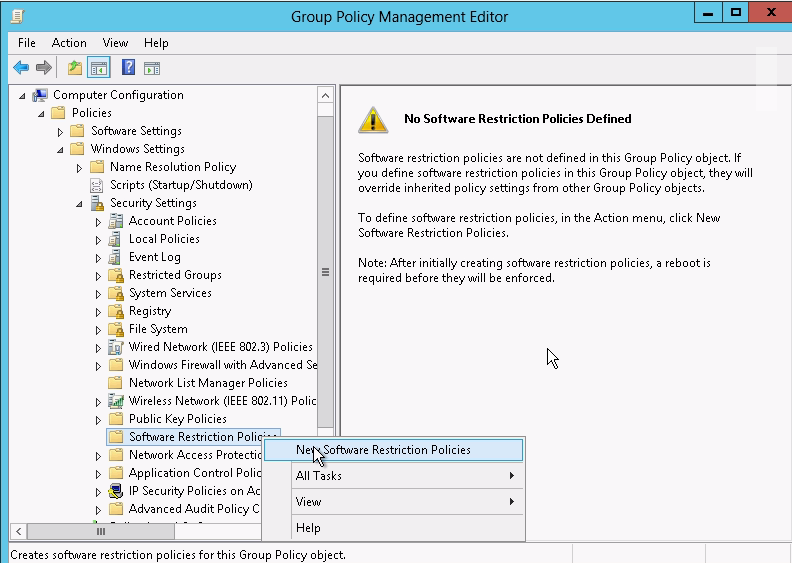
software restriction policy

  • designed for legacy windows, (xp, earlier win2k8)
  • fairly east to bypass
  • all apps allowed by default
    • make specific restrictions


applocker

  • designed for win7/8, w2k8r2, win12 and greater
  • less easy to bypass
  • all apps denied by default
    • create default rules to run basic apps to preventing locking out of system


Check inidcates active status.


New path rule - can be bypassed by moving files to different path


Hash rule - application calculated hash. but hash changes for version changes.


Applocker (use with win 2008 R2/Win 7)

in a same policy, when both software restriction policy and applocker policy is used, software restrcition policy will be ignored.  use seperate polcies for each of them. for backward compatibility still need to use software restrictions.


first thing before enableing it is Create an "allow" rule to override the "deny all" default rule. Allows all windows and program files to run.

Although, enabled, applocker is not effect until rules and Application Identity Services on the workstation


Automatically create rules - scan for and allow to run installed apps. rules automatically generated. useful for programs outside of windows and program files folder.


Deny rule


deny running notepad,.exe but allow other apps to run


Enable the Application Identity Services

enable it in the same policy


or second option is to enable in the control panel services setting


finally, applocker policy takes time to take effect in contrast to other policy settings.

Friday, January 2, 2015

starter gpo

commonly desired not required settings

administrative templates only

to start, create folder

  • includes canned (preconfigured) starters


often used for roles


  • various types of servers
  • laptops
  • desktops
  • security sensitive


exportable to cab - compressed file.


starter GPO


 not edited instead new gpo created.


when creating a new gpo you can specify a starter gpo with desired settings.


policies and preferences

both are mostly registry punches

polices (managed)


  • setting is permanant (grayed our UI)
  • applied @ startup, logon, refresh
  • removing policy reverts to default
  • policy takes precedence over preference


preference (unmanaged)

  • user can reverse settings (Ui not grayed out)
  • applied + refreshed or "do not reapply"
  • setting tattoos registry - reuires another policy to undo
  • not avalable for local GPO
  • often useful for
    • desktop/icons/shortcuts
    • url on desktop, default homepage
    • send to
    • drive map
    • file copy, update, delete


prefeences


Targeting allow how it is applied


scope of management

very important. understand precedence and inhertiacne and where to apply it.

Keep them separate ,possibly same OU in very small office

  • user config  applies to  only user OU
  • computer config applies to only computer OU 

multiple group policies often apply

  • settings are cumulative
  • conflcits: last policy wins
    • if user and computer policy conflict .  Computer policy wins
processing order
  • local default - site - domain - OU - OU
    • cumulative and last policy for conflicts wins

security filtering - utilize the OU flow to apply the policies.


Group policy results - to help in determining how policies are being applied

example use is for proxy server setting to use for a specific site


link gpo to sites.

in GPMC must display sites first


Making security exceptions


 adding additional security permissions for user is limited if not using advanced settings to configure permissions.


advanced settings allows for granular permissions and allow denying of policy.  Deny overrides other permissions.


Security templates

pre-configured settings for "security settings" (.inf)

  • workstaion, domain controller, etc

apply to single or multiple machines

apply to locally or gpo to AD

settings

  • account policies
  • local policies
  • event log
  • restricted groups
  • system services
  • registry
  • file system


configuration using these tools

  • gpo - 
    • can import using INF 
  • secedit.exe
  • security config + analysis  and security templates console
  • security compliance manager (download)


security configuration and analysis - load into MMC

  • compares local system with security setting in INF (download)


creates a database to store the local security settings


INF file to compare with the local security


 perform comparison


results that don't match up


apply the changes in INF to the local security policy to match up


create own INF with desired security settings and import into running policy